
SECENG WORKBENCH
MITM Capture, Replay & Runtime Evidence
Turn AI runtime behavior into evidence.
Capture prompts, responses, retrieved context, tool calls, and user actions across every runtime. Normalize, redact, and reconstruct interactions into audit-ready evidence you can replay, test, and trust. Runtime Proxy captures also feed directly into SecEng Adversarial Range regression runs.
Full Visibility
Capture every prompt, response, retrieval, tool call, and user action.
Evidence-Grade
Redacted, signed, and timestamped for audit and legal review.
Replay & Test
Replay any trace into the Range for regression and adversarial testing.
Audit-Ready
Export as JSON, ZIP evidence pack, CSV control mapping, or replay file.
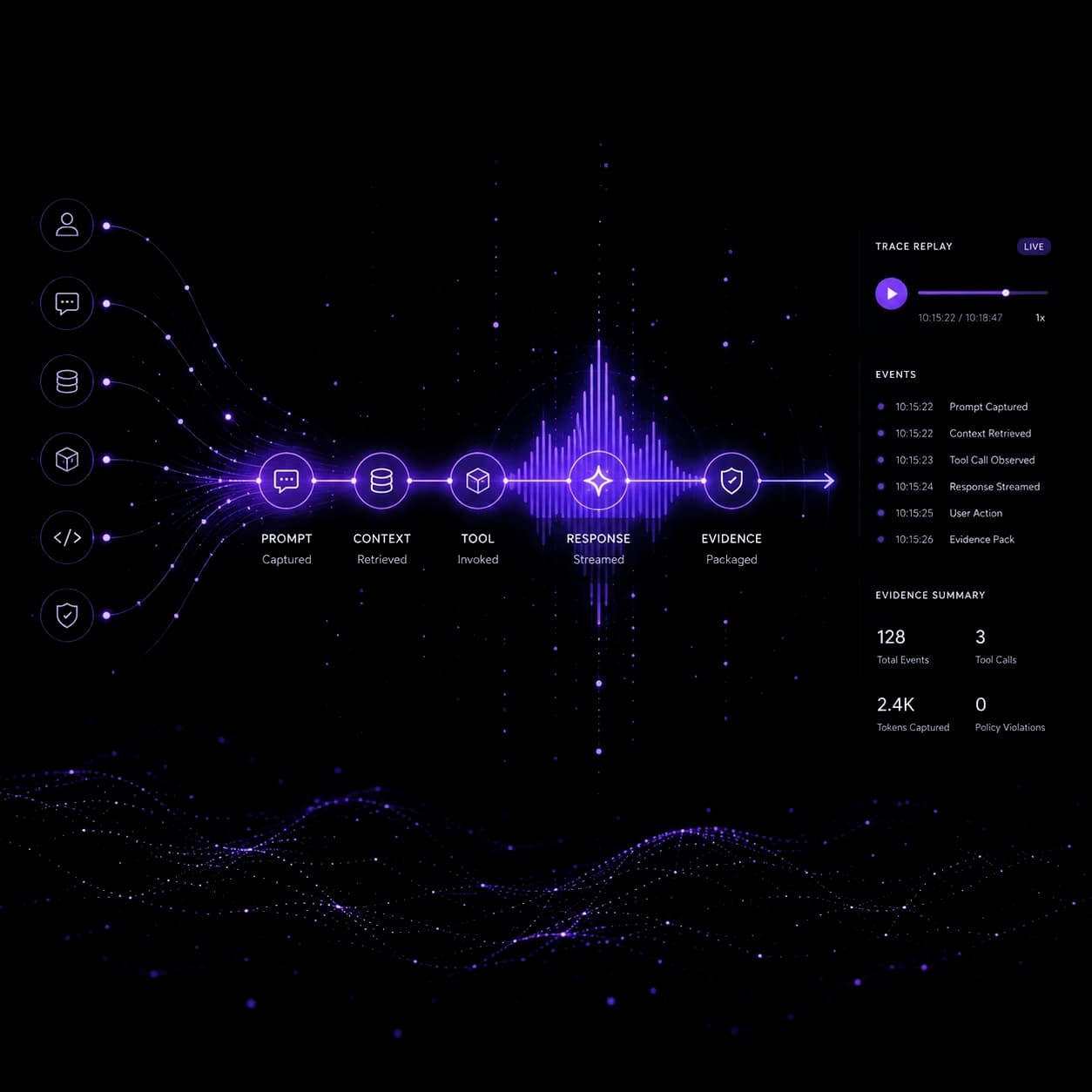
128
Total events in captured session
3
Tool calls observed
2.4K
Tokens captured
0
Policy violations
Core capabilities
What SecEng Runtime Proxy does.
Full-Stack Interaction Capture
Capture prompts, responses, streaming events, retrieved context, uploaded files, tool calls, approval events, model and provider hints, errors, and final outputs — across any AI surface.
160+ Payload Normalizers
Normalize messy payloads from OpenAI, Anthropic, Gemini, local models, and chatbots into a single AI Security Event schema. Stop correlating JSON from six different vendor formats.
PII & Secret Redaction
Automatically detect and redact secrets, PII, credentials, and regulated data before evidence is stored or shared. Built on Presidio for named-entity recognition across AI payloads.
Trace Timeline Reconstruction
Reconstruct AI interaction timelines from captured events. See the full causal chain: user input → prompt → context retrieval → tool invocation → response streamed → evidence packaged.
Evidence Bundle Export
Export as Trace JSON (Redacted), Evidence Pack (ZIP), Control Mapping (CSV), or Replay File. Ready for product security reviews, AppSec, GRC, legal holds, and incident response.
Regression Fixture Generation
Turn any captured trace into a replayable test case. Feed directly into SecEng Range for prompt injection testing, scenario rerun, and ongoing regression validation.
Evidence & signals
What you get out of the box.
Trace Timeline Events
- Prompt Captured
- Context Retrieved
- Tool Call Observed
- Response Streamed
- User Action
- Evidence Pack Generated
Evidence Summary
- 128 Total Events
- 3 Tool Calls
- 2.4K Tokens Captured
- 0 Policy Violations
- Trace ID: trc_8f3a9c2e
Export Formats
- Trace JSON (Redacted)
- Evidence Pack (ZIP)
- Control Mapping (CSV)
- Replay File (Trace)
Red team + Blue team
Built for both sides of the security equation.
Red Team Use
- Show exactly how data moved through the system during a prompt injection or leakage event
- Replay captured exploit traces into the Range for adversarial scenario validation
- Capture the full chain of a tool-abuse scenario with normalized, tamper-evident evidence
Blue Team Use
- Create signed, redacted evidence packages for AppSec review, GRC submission, and legal hold
- Build regression fixtures from real incidents to prevent recurrence
- Export control-mapped artifacts for ISO 42001, NIST AI RMF, and internal audit workflows
AI SECURITY ENGINEERING WORKBENCH
Ready to put SecEng Runtime Proxy to work?
Scope a Workbench-backed review — we'll map the AI surfaces, identify the highest-priority gaps, and give you clear findings before any larger commitment.
Also in the Workbench
WHAT AI DO WE HAVE?
SecEng Surface Scanner
Browser, Repo & IDE AI Discovery
HOW CAN IT FAIL UNDER ATTACK?
SecEng Adversarial Range
AI Red-Team Scenario Harness
WHAT CAN AGENTS ACTUALLY DO?
SecEng Authority Graph
Agent Authority & Approval-Path Analysis
WAS RETRIEVAL AUTHORIZED?
SecEng RAG Test Harness
Retrieval & Context Security Test Harness
SecEng Defend · instrument
Turn the real Tauri app into showcase material.
These blocks are generated from the actual Savvy desktop surfaces. The gallery keeps the product honest while giving the website a polished, screenshot-led story.
Desktop surfaces
Live
Screens mirror the Tauri shell, not a separate mock.
Theme parity
Aligned
Uses the same seceng panel, chip, and metric tokens.
Evidence mode
Public-safe
Shown with redaction and release-safe language.
Tauri screens
Actual desktop product screens, shown as gallery blocks.
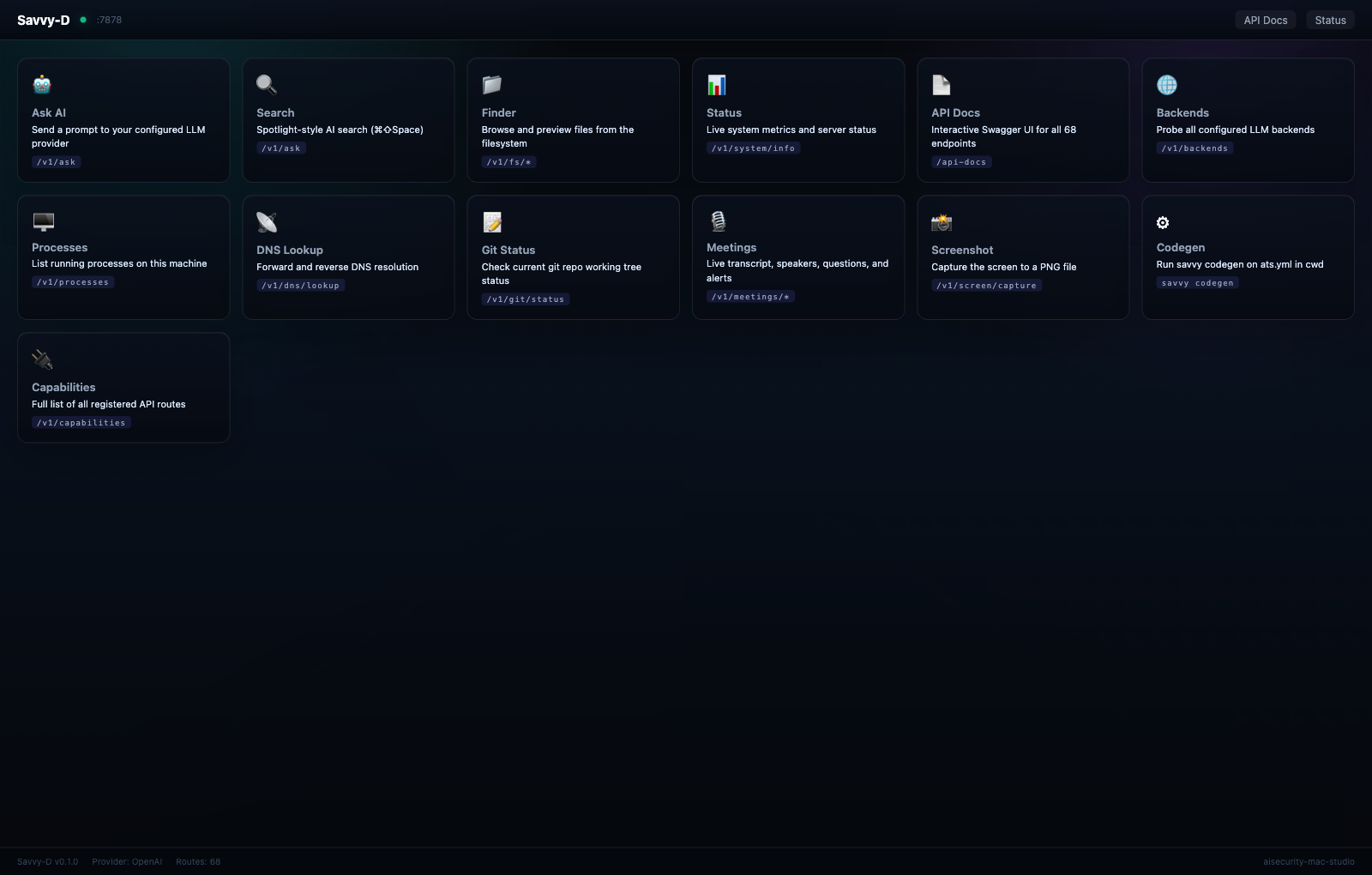
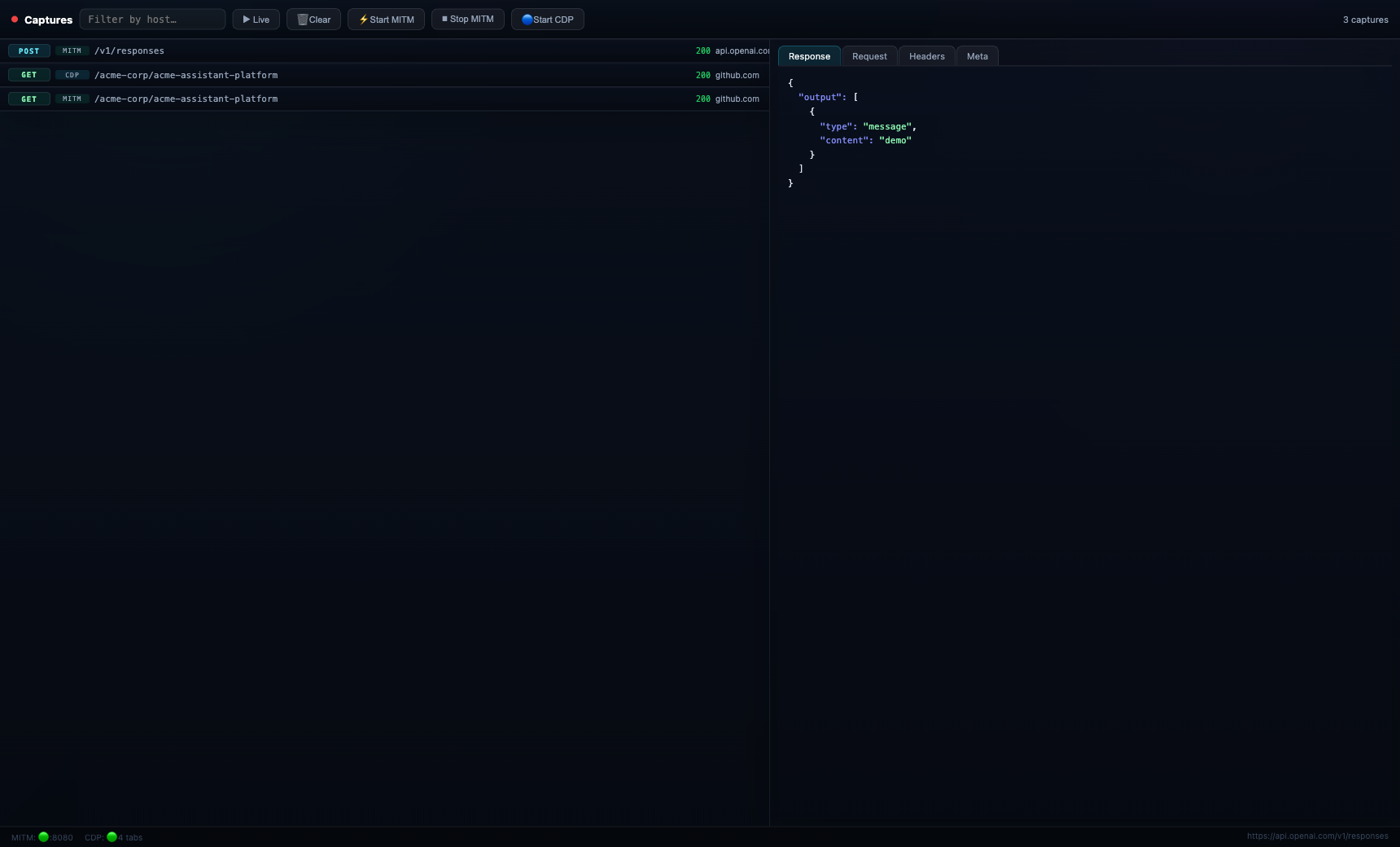
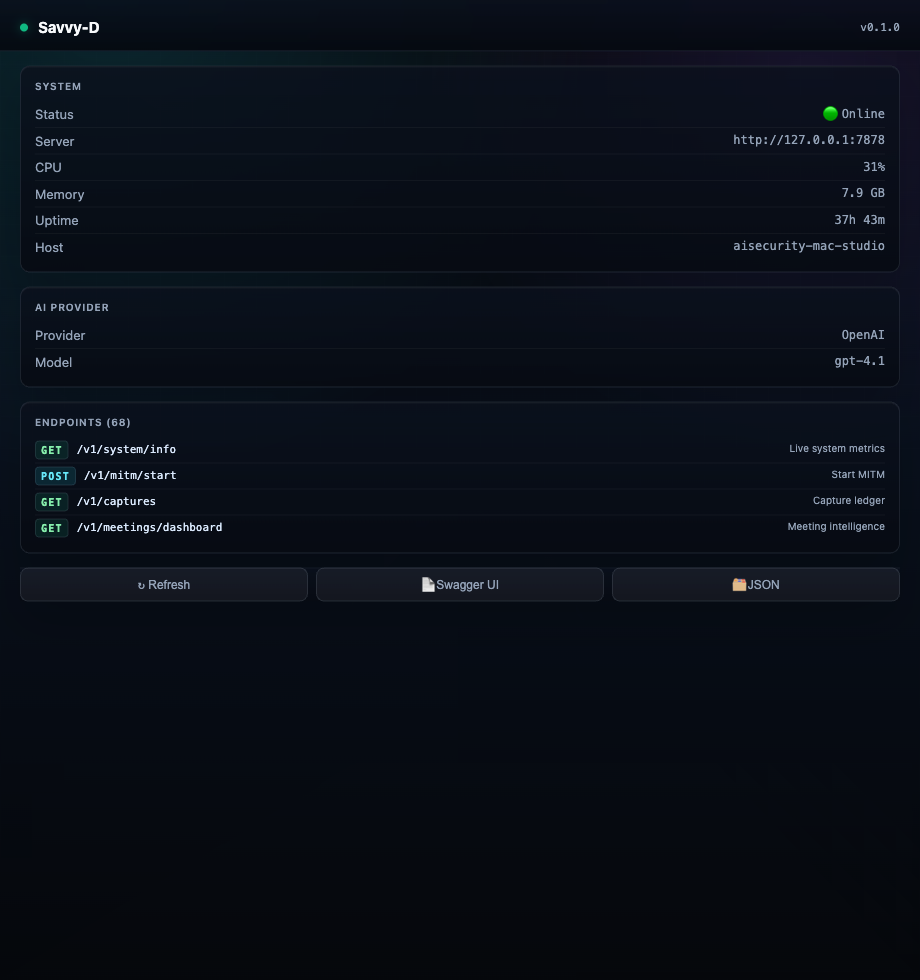
These previews are captured from the real Savvy Tauri shells and themed with the AISecurity surface language, so the product story reads as one suite across web and desktop.
Main Dashboard
Module hub with operational status, live actions, and product blocks.
Captures Ledger
MITM + CDP traffic with request, response, and metadata inspection.
Status Console
System health, provider state, and route inventory at a glance.
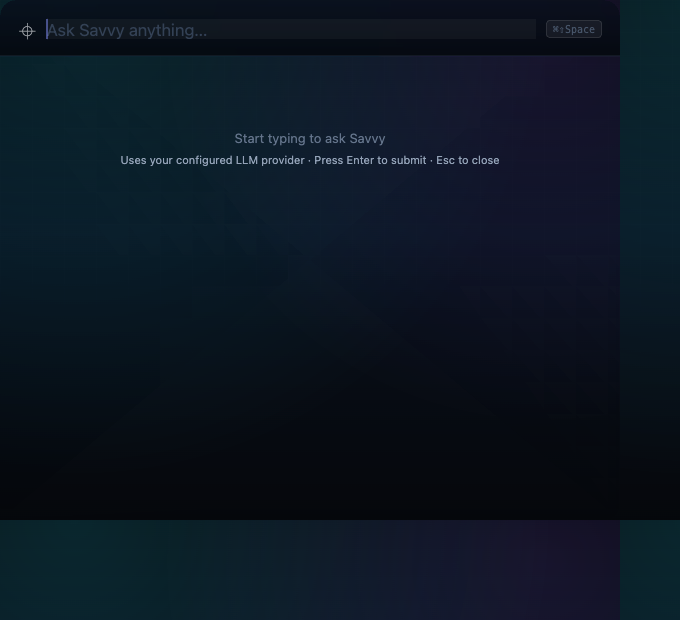
Search Palette
Compact AI prompt surface for quick operator queries.
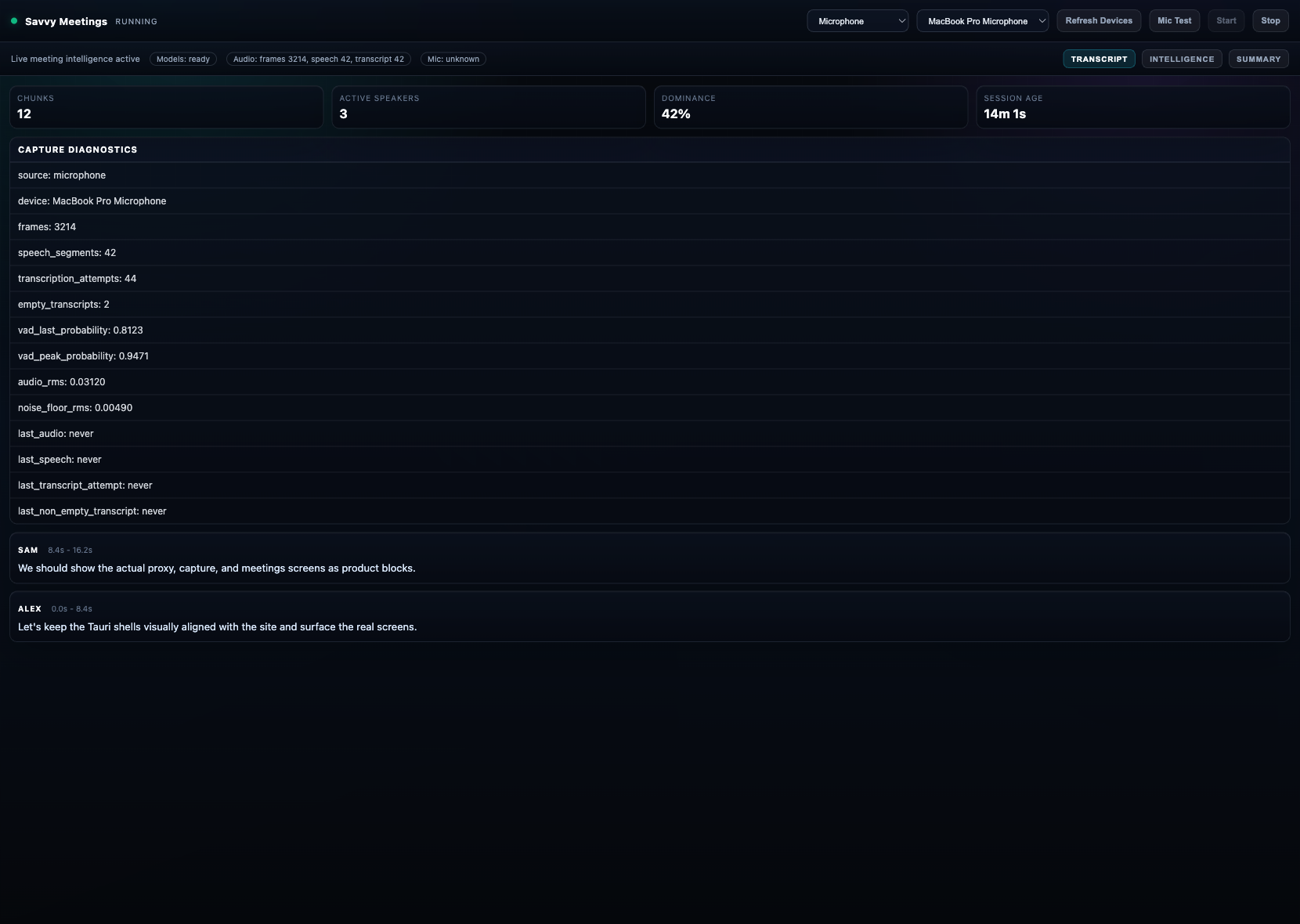
Meetings Intelligence
Transcript, speakers, risk, and action panels in a single workspace.
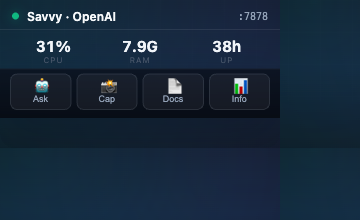
Widget Overlay
Tiny always-on-top status surface for glanceable control.
Authority graph
Show the same ACME workflow bundle on the product page.
The workflow analysis block pulls from the real SecEng Authority Graph fixture so the runtime proxy surface can explain approval coverage, bypass risk, and blast radius.
Workflow authority block
Same bundle as /workbench/workflowsAgent authority, approvals, and blast radius now live inside the trace story.
This block surfaces the real SecEng Workflows analysis bundle on the trace page, so the website, the dedicated workflows product, and the WASM gallery all speak the same visual language.
Tools
38
Discovered across the workflow graph.
Approval coverage
68%
17 enforced steps
High-risk workflows
7
Primary ACME outbound assistant risk count.
Blast radius
84
Overall high profile
Bypasses
3
Approval boundaries skipped on the bypass path.
Dangerous compositions
4
Multi-step causal chains with external effects.
Scorecard snapshot
AIPSA-style workflow result
Approval coverage
68%
Enforced across the reviewed path.
Blast radius
84
Overall high risk profile.
Bypasses
3
Approval boundaries skipped on the bypass path.
Reviewed path
Human approval and policy checks protect the primary send path before the external effect.
Bypass sink
The draft-to-CRM path still exists and must remain visible as a productized risk surface.
Key findings
What the workflow bundle says
Critical risk
Approval gate can be bypassed before the CRM update
Approval finding
Bypass branch skips human approval
Graph warning
Bypass branch detected between draft and CRM update.
Control language
Live demo
Walk through the VS Code dashboard with a fixture-driven ACME Corp repository.
Open the live demo to walk through the same dashboard panels, repo tree, risks, and timeline using a stable public-safe sample payload.
Trace export
Hand the sidecar evidence to the next stage
Sends `POST /v1/trace/export` through the local API proxy and optionally downloads the evidence pack as a ZIP archive. Use raw export only when you explicitly need internal review artifacts.
Trace lineage
Walk the parent chain behind a selected stream
Loads the current trace export and reconstructs the causal path from DOM and page actions into the stream you select. This is the release-facing explanation view, not just a raw event list.
Parent chain
Selected stream ancestry
Load a trace export, then choose a stream to inspect its causal chain.
Stream events
In-stream sequence
No stream selected yet. Load the export first, then pick a websocket or EventSource stream.
RAG boundary preview
Show the boundary lens before the full workspace opens.
The SecEng RAG Test Harness boundary component powers the Chrome side panel, VS Code dashboard, and public demo route. This preview keeps the product page aligned with the actual UI.
Surface
Chrome + VS Code
One lens, two placements.
Pipeline
Plan → Test → Classify
Using the same public-safe fixture.
SecEng RAG Test Harness
RAG Boundary Lens
Boundary planning, testcase generation, and evidence classification rendered from the same public-safe trace fixture.
AuthZ pass
Retrieval gates are mostly aligned.
Context leaks
No leak-shaped signals surfaced.
Policy violations
Policy language needs stronger enforcement.
Pipeline snapshot
5Suggested tests
3Controls found
3Affected paths
2Missing boundaries
Priority gaps
Top tests
Harness checks
The lens is public-safe and directional. It uses job-description intelligence and trace fixture signals to show where RAG boundaries need reinforcement, without exposing raw documents or private payloads.